 Best all-in-one solution for video converter, DVD tools, iPod Tools


Convert DVD to MP4 with WinAVI All In One Converter
If you want to put your DVD to play on Apple iPod, iPhone, Microsoft Zune portable media player,A DVD to MP4 Converter you must have and can easily convert DVD to MP4. MP4 files are supported by all of those popular devices. Here we will guide you on how to convert DVD to MP4 with WinAVI All In One Converter.
Step 1: Free download the DVD to MP4 Converter – WinAVi All-In-One Converter.
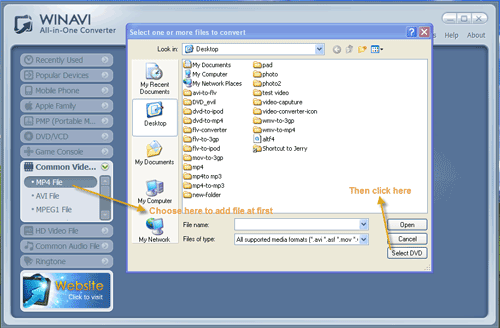
Click “Common Video File” on the left menu(Look at the screenshot below). A window will pop up and then click "Select DVD" to import your DVD folder.
Step 2: Customize output.
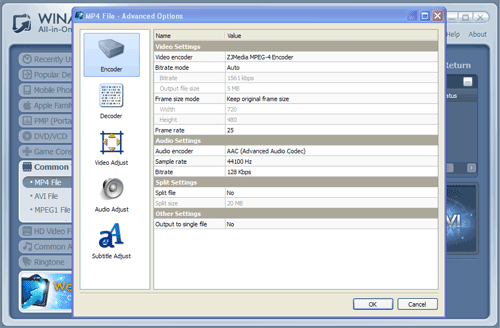
Click"advanced" to customize output video audio options like resolution, subtitle, etc.
Step 3: Start to Convert DVD to MP4
Attention: Please note that the free version has a transparent company logo in the background. The watermark will disappear after buying. Here is a registered version and no watermark.
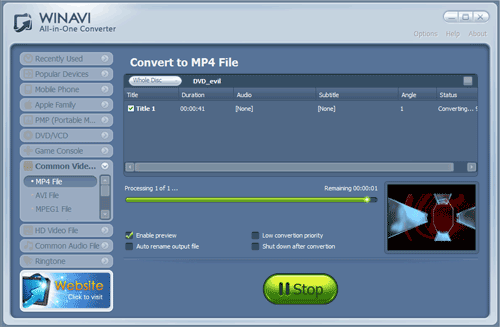
When the DVD to MP4 conversion is completed, you can enjoy DVD movies on your MP4 players.