 Best all-in-one solution for video converter, DVD tools, iPod Tools


How to Download YouTube Music
WinAVI YouTube Download is a FREE YouTube music downloader, it can download YouTube music.
It'll embed in your web browser, and you only need one click to download/convert music from YouTube (Myspace, Yahoo Video, Youtube Video...) to MP3/MP4, iPod, iPhone, iPad, PSP, Cell Phone. Enjoy your favorite music downloading now.
Step 1:
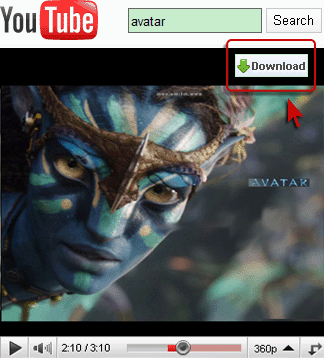
Please download and install WinAVI YouTube Download first, then you will see DOWNLOAD button on the playing video, directly click it to start download videos you want .
Step 2:
Output directory: All you have to do is to click the "Browse" button to select a folder in which to store your output files, or just enter the directory into the blank.
Step 3:
You can download YouTube music to your MP3/MP4, iPod, iPhone, iPad, PSP, Cell Phone, enjoy!